Today we explore some of the challenges with ignoring maintenance of your Sitecore installation.
Recently I found over 60% of the Sitecore master/web databases were consumed by orphaned blob records. I believe this
behavior is experienced when detaching data from an existing media item or deleting the media item. The Blobs
table contains this orphaned record until another process is triggered to purge the data. There have been several
prior articles discussing this issue so I'm simply going to outline what I discovered along the way.
The part you care about
Database details prior to cleanup
We ran this on Sitecore XM 10.2 and 10.4
Consult with Sitecore support first if you are having a similar issue
The MDF file was approaching 60GB with over 90% used space
Total blob records in the table - 127,300
Total unused blob records - 104,466
59,353 distinct BlobId values
Database details after cleanup
The MDF file now shows used space at 8% (4.7GB)
Total blob records in the table - 22,867
Total run time : 7 hours, 2 minutes, 23 seconds
The following script was used against a Sitecore XM 10.2 database. Proceed with caution.
One script that I found particular helpful was one that helped me periodically check the row count of the Blobs table.
In this article we learn about some opportunities to shield the SXA search endpoints from traffic that can produce noisy log messages.
Background
Our team frequently reviews the reports generated by a web application scanning software, an activity I highly recommend you incorporate into your process. In addition, we leverage aggregated log messages in another system (i.e. Elastic, Splunk) to better reveal what IIS and Sitecore experiences during the scans.
Research
One issue that seemed particularly interesting is related to the SXA search requests at the relative path //sxa/search/results and //sxa/search/facets. When the query string is invalid such as ?abc123 and ?l=abc123 the Sitecore logs will reveal exception messages due to the fact the query strings can't be properly bound or converted. It's not particular interesting until you see hundreds or thousands of the messages in a short window. I opened a support ticket with Sitecore and they acknowledged this as a bug (at least an issue up to SXA 10.3). Use reference number 589620 to track the progress of this issue.
Resolution
One solution provided by Sitecore support (during the interim period) is to apply a logging filter to exclude the messages.
An alternative solution is to globally prevent all of the abusive traffic from reaching your servers. If you are leveraging a CDN/Proxy product such as Cloudflare/Akamai you can deploy web application firewall rules to block the undesired traffic.
The following screenshot provides an example of rules you could put in place to reduce the noise.
The rules perform the following:
For each check we ensure that only the /sxa/search/ endpoints are evaluated.
Reject query string parameters that contain an "L" parameter with anything other than a possible language (e.g. en-US).
Reject query string parameters that do not reasonably match the values SXA is expecting.
Reject POST method.
Reject query string parameters with commands like "ping".
After making these changes we were able to reduce unnecessary traffic.
I hope you found this useful. One day you too might be investigating such a rare and peculiar issue. Good luck!
In this article we investigate an issue related to LetsEncrypt certificates configured for your web applications and services.
Background
Every so often we would notice in our non-production environment the custom contact forms would fail after the user submitted. These forms are built on top of Sitecore MVC and seemed to fail when the backend code attempted to POST to a service hosted by another team/party.
The error message we would see logged in the Sitecore log files looked like the following:
There are a few resources available online that describe possible causes for the error message and ultimately provide some kind of workaround to the problem.
The remote certificate is invalid according to the validation procedure.
When reviewing our network we could not find anything that immediately stood out as the cause of the issue. If you make the assumption that calls to the web service are not yet happening, then the next logical thing to investigate are the steps .Net performs prior to making the outbound requests.
I first confirmed that the web service URL can be reached. In my case the service has a URL to the Swagger UI available and that worked as expected. Second I checked that the LetsEncrypt root certificate was installed in the Trusted Root of the server; which it was. Finally, I used the certutil to verify the certificate which revealed some interesting results.
Running the utility output some key information we needed to determine next steps. As you can see in each of the following screenshots, the lencr.org domain is being accessed. Turns out that LetsEncrypt has a series of domains used to verify if a certificate is revoked. Read here for more details.
Resolution
Ultimately we had the Network/Security Teams put in place firewall rules to allow traffic to the various domains outlined here.
*.o.lencr.org
*.i.lencr.org
*.c.lencr.org
I hope you found this useful. One day you too might be investigating such a rare and peculiar issue. Good luck!
In this article we learn about some challenges I faced while working with both Unicorn and Sitecore CLI.
On my project we are at a stage in which a wholesale change from Unicorn to Sitecore CLI is not an option. There is however an advantage of updating the deployment pipeline to leverage the IAR plugin for the Sitecore CLI. Our current setup takes upwards of 30 minutes to complete the deployment. Imagine a folder of 40k Unicorn items and trying to zip that up, cleaning the old ones, extracting on the destination server, and then syncing items after every deployment. Deployment nights are exhausting.
Here is a brief list of issues I uncovered along the way.
Minor issues in YAML compatibility between Unicorn/Rainbow and Sitecore Rainbow.
Content of YAML may cause the creation of Items in Sitecore without a language version.
YAML Compatibility
The majority of the team is still relying on Unicorn to serialize content to disk. If you use Sitecore CLI to also serialize items, including overwriting files previously serialized by Unicorn, you'll notice some fields missing.
In the following partial example, if this was generated by the Sitecore CLI the database name would be missing which could cause an issue with Unicorn.
In the following partial example, if this was generated by the Sitecore CLI the Multilist field type would be missing which causes Unicorn to sync the fields without the pipe delimiter.
Recommendation: If you are going to also use the Sitecore CLI to serialize items, take note of what fields go missing and make sure they are added back.
The command used with the Sitecore CLI to generate IAR items would be one of the following:
Most installations of Unicorn will exclude several fields such as __Revision. This missing from the serialized items (both in IAR form and YAML) may cause the Sitecore Publishing Service to improperly delete items during publishing. Due to this issue both SXA and SPE now include the revisions in the IAR files.
Another interesting discovery is how few fields you may see listed under each language version. In some files generated by Unicorn I noticed no fields listed under the version. Not sure if this was a mistake during developers merging or something else.
In other cases I found by excluding fields in the sitecore.json as seen in the official docs the YAML serialization and IAR generation will result in fields missing as well. The one time I actually read the manual I end up introducing an issue. (sitecore.json fields removed for brevity)
With the above configuration all the fields serialized are excluded when interacting with the Sitecore CLI. This certainly becomes an issue for items without other fields (like folders).
No fields equals no language version. No Language version equals a broken SPS. Kittens will cry. Ice cream will melt.
In this article we will see how the Default Identity Provider used with Identity Server learned a new behavior with role management when resolving users on sign in. This impacts Sitecore 10.2 when the cumulative hotfix 10.2.1 is installed.
Back Story
Here is how things played out for us. After we upgraded to Sitecore XM 10.2 we started to experience an issue on startup (typically after the application pool recycled) related to a concurrency issue when loading the IAR files. Specifically an ArgumentNullException is bubbled up to the Sitecore.Data.DataProviders.CompositeDataProvider which causes Sitecore to really struggle. Recycling the application pool once more generally resolves the issue. After opening a support ticket we learned the issue was recently resolved by a cumulative hotfix outlined here. Problem solved!
Unfortunately the hotfix revealed another issue which relates to how user membership is managed during the signin process. We found this during a deployment and users started to complain about not being able to do anything more than login.
There exists a SignInProcessor which resolves the user, either by accessing the existing user or creating a new one. The hotfix includes a change to the internal code for this processor. Sitecore Support provided some additional details as to why things changed. I'll put into my own words the message they conveyed in the ticket:
The correct behavior for Federated Authentication is to allow the Identity Provider to control the user roles. The original implementation did not adhere to this and as such you could override the roles assigned to users from within Sitecore.
We are using ADFS and have things configured to require users to be in the Active Directory role "Sitecore-Users". We implemented a Sitecore.Owin.Authentication.Services.Transformation to override the claim roles and specifically only add Sitecore\Sitecore Client Users. You can read more about my implementation here. After the user performs an initial login, an Administrator can then assign roles from within Sitecore. This is super helpful as our corporate process for managing access is more tedious/slower than doing so in the Sitecore User/Role Manager.
The Fix
So imagine you are deploying a hotfix late at night and discover this issue. Opening a support ticket is great but obviously won't pull you out of this hole you just dug for you and the team. After a few minutes of poking around I narrowed the issue down to Sitecore.Owin.Authentication.Pipelines.CookieAuthentication.SignIn.ResolveUser where the new implementation wrecks our current process. Below is the implementation I extracted and used from the original 10.2 version.
Here's the code:
If you do come across this issue you may be on Sitecore XM 10.3+ and find that a new setting is available to restore the original functionality.
In this article we discuss some of the challenges with the out-of-the-box Task Scheduler included with Sitecore and see how you can replace it with Hangfire, a product to perform background processing for .Net applications.
Update: A NuGet package is available for download here.
There are ton of articles describing the Task Scheduler and oftentimes cover the same information. Below are few to get you started:
Oddly the only things I can find on the Sitecore docs site is from the old SDN. I'll skip linking that here because it is likely to break.
Some of the issues you'll find with the Task Scheduler is the inability to run at a specific time and if Sitecore shuts down the missed tasks are likely to run immediately following startup. With the use of Hangfire we'll address both issues. The format of the schedule field is also a bit crazy and so we'll add to the complexity by including support for the cron format.
So why not SiteCron? You should use it. If however you can't use it, don't want to use it, or simply can't make up your mind then feel free to give this a try.
Here is a quick breakdown of what we'll build:
Pipeline processor inheriting from Sitecore.Owin.Pipelines.Initialize.InitializeProcessor which should give us access to IAppBuilder. Here we'll register Hangfire and handle scheduling of jobs.
Configuration patch to disable the agent used for scheduled tasks and to register our new processor. There are multiple agents used for scheduled tasks, so at the moment we'll only focus on the one that runs for master in the Standalone and ContentManagement roles.
The important part
Sitecore configuration patch to register the code:
Explanation:
Register processor in the own.initialize pipeline. The first option allows you to provide the amount of time to delay running scheduled tasks after Sitecore starts up; this is extremely helpful if you want to disable jobs and need some extra time or the jobs are process-intensive and you want to give Sitecore time to warm up. The second option allows you to adjust the frequency in which schedules configured in Sitecore (from the Content Editor) are updated in Hangfire; this is important for cases where Admins create/update/remove scheduled tasks.
Disable the the Master_Database_Agent so the old scheduler doesn't run.
Sitecore processor:
Explanation:
You'll need references to Hangfire.AspNet, Hangfire.Core, and Hangfire.MemoryStorage found on Nuget. I went with in-memory storage because I like things simple and having to setup connections to a database and custom tables sounds like a pain. Also, I feel like looking at the LastRun field was enough to satisfy what I needed.
In the Process method we do the basic configuration for Hangfire. I don't care about the dashboard like described here and here. Once again, I like things simple and adding another thing to maintain is just not for me. If you want to then go knock yourself out. We also schedule a fire-and-forget background job to initialize the scheduler which includes registering Scheduled Tasks defined in Sitecore.
Once the first background job runs, which may execute tasks that missed their scheduled run time, the recurring jobs are configured. Any scheduled task with an empty/invalid schedule is ignored. The creation of the recurring jobs are chained to the Initialize method so we can ensure that anything missed runs before we schedule others. This may be a problem if you have really long running jobs.
The default schedule format {start timestamp}|{end timestamp}|{days to run bit pattern}|{interval} is compatible but converted to a cron schedule format when registered (see GetSchedule method). The interval may be converted to a precise time when using the daily TimeSpan format. For example, the value 1.04:30:00 will run daily at 4:30 AM. The conversion code produces a cron format 30 4 * * * which is what ultimately gets provided to Hangfire. If you want to replace the default schedule format with a cron schedule format go right ahead as both formats are supported. The only problem I saw with this is when using the SPE Task Manager because the tool doesn't know anything about cron.
A simple report can be written with Sitecore PowerShell Extensions to display the current configured recurring jobs.
We've had it running for quite some time now and it has been a game changer for us. Think of all the scheduled tasks that seem to randomly run during deployments or competing with processing power needed by Content Editors.
Give it a try and let me know how it works out for you on your projects. Feedback welcome.
Disclaimer: After sharing this post I was reminded of an important distinction one should make with bolting on more features to the Sitecore platform. I found Hangfire helped solve an issue we were having with our scheduled tasks. Every day we run tasks that execute SPE scripts and these can be quite CPU intensive. The data belongs in Sitecore and the tasks need to be run outside of business hours (late night or early morning). As a separate application we built a sync with Quartznet using dotnet 6 (latest LTS version at the time) which dramatically improved the developer experience, performance, and maintainability.
Today I'm pleased to announce the release of Windows Hosts Writer 2.0! In this article we'll learn about what is new and how to get started. Also, a reminder about the pain of managing the hosts file.
There are many steps needed to get a website running locally. For traditional sites hosted with IIS you have to add application pools, websites, perhaps configure services accounts...the list goes on. One of the tasks that feel the most tedious is adding entries to the hosts file. If you are not familiar, this is an extension-less file found at C:\Windows\System32\drivers\etc\hosts and contains IP-to-Hostname mappings. Each row will have an IP address such as 127.0.0.1 followed by the hostname such as scms.dev.local.
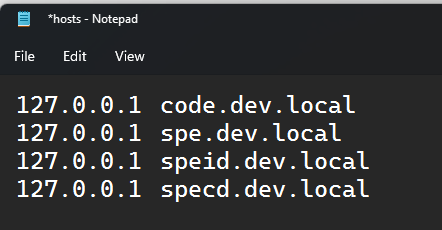
If you open the hosts file you may already see something like the following:
As you can see from the above image, there is not much going on. This file comes in handy when you want a fancy url to loop back to the local machine. So now you must be wondering how does Windows Hosts Writer (WHW) relate to this? When paired with Docker it can save a tremendous amount of time in managing the everchanging IP addresses.
A while back Rob introduced the Sitecore community to a neat tool distributed through its own Docker container. Check out his series of articles detailing the improvements made over time.
Finally, what is so important about this new 2.0 version of WHW? I'm glad you asked before bailing out on this lame blog post. Below is a breakdown of all the goodies.
Support for .net 3.1 ends December 3, 2022 while 6.0 is the latest version released with LTS. We went ahead and upgraded before we forget.
Fixed an issue with the TERMINATION_MAP feature. 🥇
Aliases that are space-delimited are treated like all the other host entries.
Consolidated the Dockerfile which enables contributors to debug locally with Visual Studio, build from docker-compose.yml, and ensure @RAhnemann can still do releases. 👍🏼
Encriched the readme with helpful details on getting started. Run docker compose up -d from the root directory to try it out.
Updated the referenced Docker.Dotnet assembly to address the dreaded exception Docker.DotNet.DockerApiException: Docker API responded with status code=BadRequest, response=400 Bad Request. This might have been revealed after upgrading Docker to 4.7.1.
If you want to get started, check out the readme on GitHub. The Docker images have been pushed to DockerHub here.
In a previous article I shared how I configure Sitecore projects with Unicorn when developing sites for SXA. In this article I share some improvements that can be made to simplify the number of configuration files you have to manage.
At this point you may have heard that Sitecore 9+ includes a capability for altering configuration files using custom defined application settings. Kamruz Jaman has written a detailed article covering many aspects of the features.
Let's have a look at what can be added to your configurations to control them per environment.
Begin by starting with a structure similar to this:
The part that is new and most interesting is the namespace added called environment. For this to function we need the "Web.config" to define it.
This is going to tell Sitecore that we have a namespace we intend to use in our configuration patches and for this transformed Web.config the value is "Dev". I like to use "Dev", "Int", "Tst", "Prd" for the environment names.
Let's take a look at a more complete configuration for use with Unicorn.
You'll notice that the include statements have duplicates such as "Forms" and "Content". This is possible because the environment values will limit only one to appear at any given time.
I certainly hope you found this to be helpful. Happy 2020!
In this article Michael shares how to configure Sitecore running on Docker locally with HTTPS. A sample repository is provided to help you get started.
If you don't care to read this article and just want the source code then check out this link right here. There you can see how to get thing setup.
The Background
There comes a time when every developer is going to need Sitecore running over HTTPS. If you have been following the progress the Sitecore Demo Team is making with Docker you'll see that getting started is going to be far less complex for everyone. If you have not yet already seen the GitHub repository feel free to do that once you've finished reading this post.
There are a few articles written recent to this post around getting started with Docker running Sitecore. You may find that some eventually are outdated because the Sitecore Demo Team is moving at such a fast pace the instructions in the articles go stale. Nevertheless the articles provide valuable insight into what you need to do for things to run smoothly. I trust that you will take the time to (if not already) to familiarize yourself with Docker. For those that have worked with Sitecore for any amount of time, surely you will appreciate the simplicity Docker brings.
Note: At the time of this article SIF is no longer used for the Sitecore Docker images. I'm very thankful for this because it makes setup much easier to follow on how things work.
Recommended articles:
Sitecore Docker for Dummies - This 3-part series is actually the nudge I needed to get started. Mark Cassidy does such a fantastic job covering the basics. No time is wasted on unnecessary tasks, like setting up a Docker Hub account. If you install Docker through Chocolatey no account is needed.
Yet Another Sitecore Docker Series - This 9-part series goes into a bit more detail about how the build of images and running containers come together. Rob Ahnemann is very clear about how things work and at times provide a bit of comic relief.
Open the file docker-compose.yml to have a look at what is going on. This compose file assumes you have images built and available on your machine for Sitecore 9.3 XM.
Open the folder Startup and with an elevated PowerShell console run the createcert.ps1. By default the script creates a Self-Signed Certificate using the DNS "*.dev.local" then installs locally. Files will be generated in the same directory to be used by the running container (pfx and txt files should now exist).
The file startup.ps1 will be used by the running container to install the certificate and configure the HTTPS bindings.
Run docker-compose up.
Navigate to https://docker-https.dev.local/sitecore.
If everything is setup properly you'll end up with a console full of log messages and finally the login screen to Sitecore.
The Magic
I made this video to help walk you through the different parts with a tad bit of colorful commentary.
Amazing how fast 2019 has come and gone. So many hours spent working on and talking about Sitecore. In this post I share my appreciate for those donating through GitHub Sponsors.
GitHub Sponsors
It was a huge surprise to me this year when GitHub accepted my request (due to nominations) for the Beta program of GitHub Sponsors. If you've not heard about it you can read more about it here.
There's a new way to support your favorite developers and open source projects.
Yesterday we launched GitHub Sponsors, a way to fund developers directly within GitHub.
I was so excited the signup started for the beta program. Then much to my surprise the Sitecore community rallied behind me and helped nominate me. I'm confident this increased my chances of getting into the program. Now GitHub Sponsors is out of beta so you too can apply.
Shortly after the sponsors started to sign up one by one. I'm forever grateful for your contributions. In 2019 these beautiful people found me worthy of supporting.
So you might be asking yourself, "Why support Michael West?". I'm a contributor to the module Sitecore PowerShell Extensions and this requires quite a bit of personal time. I've enjoyed working on it these past several years and your support helps keep me going. If you feel like now is the time you would like to join in then by all means click this link right here!
How have the donations been spent?
Purchased beer and root beer at various establishments.
Loaded up on 100% Maple Syrup. Don't judge.
Renewed SnagIt and Camtasia for the 2019 maintenance year.
Covered some expenses for the Sitecore Symposium 2019 trip.
Ordered new SPE gifts (stickers, coasters, buttons, etc.). If you are a sponsor and for some reason I haven't given you any of this please let me know. I'll ship it to you right away.
In this article Michael shares how to make your custom components, built for SXA, support the donut caching feature.
Today we discovered that one of the forms on our site would simply refresh as you hit the submit button. Further investigation revealed that this component was added to the Sitecore cache. Whenever we cleared the cache the component worked as expected, once. Oh no!
The fantastical SXA module supports donut caching which is made visible through a checkbox on the rendering parameters.
Donut caching setting on the Page List component
This setting is added on the rendering parameters template. Not sure which rendering parameter template is used? You can check it out on the component defined under Layouts.
If you navigate to that item you'll see under the template inheritance a base template for caching.
If you wish to add support for this capability just add the template to your custom rendering parameters template.
At the time of this article, the template ID is {6DA8A00F-473E-487D-BEFE-6834350D5B67} and can be easily added in the Raw values mode of the Content Editor.
Note: When cloning components you will probably use the rendering parameters template included with the original component, in which case you don't even have to do anything special.
If you enjoy using SXA and what to share your appreciation to the team or have questions be sure to check out the #sxa channel on Sitecore Chat.
Every new website requires some level of security configuration before launch. In this article we see one possible solution to applying security to sites built with the Sitecore Experience Accelerator (SXA).
Please note that the following scripts were written before the SXA module included scripts to manage security. I encourage you to evaluate those included out-of-the-box.
Role Configuration
Let's have a look at how the security will be setup for each tenant.
Each tenant will be organized by the company name. Companies have their own domain.
At least three of the six roles exist for all tenants (Admin, Editor, Developer). Each role inherits from a Base role (Sitecore Client Authoring, Sitecore Client Users) so they can login and manage content.
Tenant roles mapped to Sitecore roles
Running the script will present the user with a dialog like the following:
Dialog before security settings are applied
The dialog lists all of the available SXA tenants as well as any additional domains configured using the switching provider. This can be very helpful when using the Active Directory module because those users are not in the same domain as the tenant.
Show ribbon button using rules
Script Highlights
Let's walkthrough what changes are applied by the script.
Results output after completion
Site - Admin role granted access to help cleanup after users.
Home - Base role granted access to manage content.
Overlay - Admin role allowed to manage overlay content.
Data - Base role granted access to manage grandchildren. Prevents users from deleting global folders.
Media - Base role granted access to manage available media library folders.
Media Library - Base role granted access to manage media for this site.
Presentation - Developer role granted access to manage Rendering Variants, Partial Designs, etc.
Theme - Developer role granted access to manage media for this theme.
Data Templates - Developer role granted access to manage data templates.
Publishing Targets - Editor role granted access to publish to any target.
Languages - Everyone role granted access to read/write to all languages. This includes the tenant domain and additional domains selected.
System Settings - Developer role granted access to manage Modules, Settings, Tasks, and Workflows.
This will of course not cover the granularity that your company requires, but should provide you with a framework for crafting a tool for your own needs.
Hope this inspires you to build something great and share with the community.
Another year to be thankful. There are so many people in the community that I learned from this past year. I appreciate the time and energy they invest into me and others that I thought recognizing them would be appropriate.
My wife and I celebrated the birth of our first baby (Bella). Was so awesome to be gifted with a baby onsie for Bella. She loved it!
Community Members
Below are some people I had the opportunity to learn more about this year.
Corey Smith - I really enjoy talking with this smart guy about Sitecore and SXA. I recall a phone call we once had about something I had been working on; so encouraging to hear his feedback. He too shared some really cool things with me and the community. His contributions to JSS have been phenomenal. One time he even shaved his mustache off for the benefit of a beloved community member. I look forward to seeing him succeed in 2019.
No mustache.
Una Verhoeven - What a renaissance woman! She achieved just about all the community badges possible in 2018. Exciting that she was honored with the MVP award this year. I look forward to hearing about her new job in 2019 and celebrating her new achievements.
Enjoying her vacation, not thinking about work.
Saad Ansari - Sitecore Sam has been so helpful this year. Nice to see someone invest time in crafting quality blog posts (with nice imagery). Always finds an opportunity to help answer questions. What a great future MVP.
Actual photo of Saad.
Neil Shack - One of the best examples of a generous person. He was handing out this super cool book of Sitecore tips like it was candy. So good. Was great getting to visit with him again at the Sitecore Symposium. Not a bad housemate either!
Thomas holding the book. Neil on the right.
Some other community members that I appreciate were shared in this previous post. Please read about it and tell them how much of a positive impact they had on you.
Final Thoughts
I encourage you to show your appreciation for those that have really helped you. Consider recommending those same people for Sitecore MVP. Also, try not to DM those people on Slack for support; stick to the group channels and only shift to the DM when they invite you to do so.
In this very short post I demonstrate how to override the EnvironmentSiteResolver included with SXA to remove the use of fast queries.
This was tested on Sitecore 8.2.7 and SXA 1.7.0. Most of this is copied from the SXA library Sitecore.XA.Foundation.Multisite. I changed ResolveAllSites to call the local function GetContentItemsOfTemplate instead of the extension method. Then GetContentItemsOfTemplate calls the link database for items.
Thank you to my friend Corey Smith for his help in cleaning up the copy/paste mess that was in my initial version.
My friend Neil Shack released an excellent series of books that every Sitecore enthusiast should have entitled The Little Book of Sitecore Tips. I am honored to be a technical reviewer in the second edition and very much appreciate him giving me the opportunity. In this post I share details about how I would like to release a sister series called The Little Book of Sitecore PowerShell Tips.
The Vision
The Sitecore PowerShell Extensions module is an amazing add-on available for Sitecore. Those using it would agree that it provides incredible flexibility and opportunity for feature development. Even the documentation is amazing. The user base for SPE stretches around the globe, with each individual bringing a unique perspective.
Since the module is built by the community, I would like to give the community an opportunity to help build a book of their best tips and tricks.
The Mission
Before a book can be published there needs to be content. While I may have some experience with SPE, I don't have all the best ideas about what tips and tricks mean the most to new and seasoned users of the module. I'm requesting that anyone that has used the module submit their best tips.
I would like the best tips to be included in the book, with credit to the submitter on the same page as the tip. Just think, if you submit a great tip your name could be published in the book!
The Plan
Please follow this link to submit your ideas. Once I have enough I'll organize them by most creative and helpful. I appreciate your help. Let's built something awesome!
The Sitecore Developer Trial Program was made available to .Net developers and students who do not have access to a customer or partner license with complimentary training. Here I share my story about how the Sitecore Community made an impact on my life and how the trial license can set you on a path for an even more amazing career.
My Story
Have you ever felt like there was something missing in your career? Perhaps something you could not quite put your finger on? I remember sitting at work, staring up at the ceiling, wondering… pondering whether the projects I worked on were satisfying and gave me a sense of fulfillment.
The three years prior had a gradual decline in things new, interesting, and challenging. Working as a developer it is too easy to become isolated, especially when you are the only person assigned on a project/working remote.
One morning I see a message arrive in my inbox stating that our company had access to a content management system, something I thought our company would never spend money on. At that time the Marketing Team managed the code deployments for the website; I'm sure you can image the problems that created. Surely a CMS could help change things; especially with a cool name like Sitecore.
Soon enough I was sent off to training in some fancy building that had a tiny deli. Most of the people in my class had already experienced Sitecore and were simply there for the certification. Little did I know the next 9 months would be the craziest and most rewarding time. Every day there was something new for me to learn.
In 2013 Sitecore Slack and Sitecore Stack Exchange did not exist, and no Dallas Sitecore user groups were organized. If I wanted to meet new people I had to start connecting with people that blogged or built open source modules. One day I stumbled across a little module on the Marketplace called Sitecore PowerShell Console, you may have heard of it. I had recently been diving deep into all things Windows PowerShell, and to see this module was such an exciting moment. I soon reached out to the genius behind it named Adam Najmanowicz. He's such a great guy and when I offered to make some contributions to the module he gladly accepted. As time went on my contributions to the module increased, as did my connection to the community.
Adam and Michael at Sitecore Symposium
My first Sitecore event was to the Sitecore SUGCON NA 2015. Akshay Sura helped make that event happen, and I'm very thankful that he did. Since then I've attended a few of the Sitecore Symposiums and Summits. These have been such memorable experiences, especially when the avatars you see every day come to life, with beards as large as their personalities.
Trial License
Something really exciting for me is to see new members join the community and build relationships.
Follow the link to signup for the Sitecore Developer Trial License. You get 60 days, which is a whole lot of time to learn and way more than other trials offer. You can apply for a second extension for another 60 days. Just think, in 4 months you could be well equipped to start a career as a Sitecore Developer! You should consider reading this post Getting Started Learning Sitecore as a starting point for your Sitecore journey. The Sitecore Developer Foundation eLearning is another free resource for you.
Here are some things you can explore with the trial license:
Sitecore 9
The newest version includes support for the newest Forms module and xConnect! Read more here on a summary following the 2017 Sitecore Symposium by Hammad; really nice and concise write up.
Module for rapidly building websites with a ton of functionality included out of the box. I've really enjoyed working with the module. Even came up with some extensions for the community.
Learn about how Sitecore recommends organizing solutions. This has forced me to rethink how I structure code and ensure I follow practices acceptable to other leaders in the community.
The trial license makes available features that even a Sitecore client may have not yet have access to.
Closing Thoughts
Crazy to think that it's been almost 3 years since Sitecore Slack was setup by my friend Akshay, now with more than 3800 members. Joining the Sitecore community has given new life to my career by helping me connect with an army of enthusiasts I would have not met otherwise. I hope by sharing my experiences you are encouraged to connect with others. At the end of the day, all that really matters are the relationships that you've built.
Sitecore Sam's Story - I really connected with Sam's story. You should read it too.
In this article I demonstrate how to create an NVelocity tool to access properties from a Sitecore ReferenceField.
As a followup to my post on building a custom tool in SXA, I wanted to share a new discovery which makes greater use of NVelocity.
If you have used Rendering Variants in SXA you may have come across the token $item. With this token you are able to access data on the page item. Rather than have the page contain all of the data, why not make use of a ReferenceField such as a droptree and get the data from that item.
Update 20180914: I started thinking about blogging a new article to discuss the use of Google Static Maps, but then remembered that this article shows the use of that! Once consideration to make is that the images could be lazy-loaded using some simple JavaScript if you wish to reduce hits against your API quota. In the Summer of 2018 Google started charging, so reducing this could help your company save some big bucks!
Location Page with Reference to POI
SXA provides a way to store Points of Interest (POI) and link to a page. In the following example, you can see that the My Location POI allows for a link to a page. I personally don't like relying on this direction of reference because I expect the page to either inherit from POI or reference a POI.
In my solution, I create a new field on the page called "POI" and link back to the POI. As you see below, the new field points back to the global data directory so the user can pick from an existing list of POIs.
I would imagine an automated process mapping the POI to a page, but that's a problem to solve for another day.
Build the Tool
Getting back to the item tool, we need to create a new method for accessing a reference field.
Create a tool called $itemFieldTool and then use it in the rendering variant.
Use the Tool
In my use case, I needed to show a Google Static map on the page. Here is the rendering variant I setup.
The Map VariantTemplate contains the data from the gist. In the below example we have a Google Static Map getting loaded; you may want to lazy-load to reduce hits against your quota. Consider creating another tool ($mapTool) to return the MapsProvider key from SXA.
The part that I found really cool was that you can create a new variable called $refItem and it would appear in the same context as $item.
This is where the fun part is in the gist:
#set($refItem = $itemFieldTool.GetItemReferenceItem($item, "POI"))
I hope this helps you build something super awesome. If you use it please share a link in the comments so others can celebrate your success.
If you have worked on any website navigation, you may have encountered a scenario where you need to represent a link in the menu, such as to the Home page. In the following post I'll describe how I created a link to a page, without there actually being a page.
As you can see in the above example, the Home page is represented as a sibling to the About and Locations pages.
I created an item in the tree to represent the Home page, but without all of the overhead of a full page.
Out of the box
Let's have a look at what comes out of the box, and why I decided to do something different.
While working with SXA you'll see that there is a Navigation component which allows you to specify a few properties to simplify the setup.
The option to include the root page should work for you in most scenarios. When the markup is generated, you however do not see the Home page on the same level. Let me show the differences in markup.
Here is an example with the root page included and the structure flattened. Notice that the real Home page is at level0, and my fake Home page is at level0 but nested under a ul li.
As you would expect, if you don't flatten the structure the level classes change but the markup is the same.
By creating the fake Home item you are able to eliminate the level0 and thus simplify the markup. Notice that the levels begin with level1.